

Your Instagram profile acts as your digital handshake in the modern era. When a potential follower, brand partner, or customer lands on your page, they make a split-second decision about your identity. While your photos and bio do the heavy lifting, the actual text of your name often gets overlooked. Most users stick to the default system font which blends into the noise of millions of other accounts. This uniformity creates a missed opportunity for branding and visual distinction.
Table of Contents
By learning how to change instagram name font, you can disrupt the visual pattern of a user’s feed. It signals creativity. It signals attention to detail. It differentiates a casual user from a curated brand experience. However, Instagram does not make this process intuitive. The app does not offer a dropdown menu for fonts, nor can you simply select “Bold” or “Italic” from the settings menu. To achieve this aesthetic, you need to understand the mechanism of copy and paste fonts using specialized external tools.
For the fastest, safest, and most compatible results discussed in this comprehensive guide, we recommend using https://fancyfontgenerators.com to generate your text instantly. This tool ensures the characters you choose are optimized for mobile visibility and Unicode compliance.

This guide is a strategic breakdown of the entire ecosystem of Instagram typography. We will explore the technical “how-to,” the psychological impact of aesthetic fonts for instagram, the critical accessibility risks that most influencers ignore, and the SEO implications of deviating from standard text.
Understanding the Core Concept: How Instagram Fonts and Unicode Actually Work
Before you start pasting symbols into your profile, it is vital to understand the technology behind the text. Many users mistakenly believe they are “hacking” the app or installing a custom font file like they would on a computer. This is incorrect. Understanding the difference between a typeface and a symbol is the first step to mastering instagram display name style.

The Science Behind the Fancy Text: It Is Not Actually a Font
When you see a profile name written in cool fonts for instagram name like 𝕭𝖑𝖆𝖈𝖐𝖑𝖊𝖙𝖙𝖊𝖗 or 𝒞𝓊𝓇𝓈𝒾𝓋ℯ, you are not seeing a different font family like Times New Roman or Arial. You are actually seeing Mathematical Alphanumeric Symbols.
These characters come from the Unicode Consortium. Unicode is the universal standard for text encoding that allows computers to represent text in most of the world’s writing systems. Within this massive library of over 140,000 characters, there are specific sets originally designed for mathematicians, scientists, and linguists to express complex formulas.
For example, a bold text “A” in Unicode is not just the letter “A” with a bold styling attribute applied to it. It is a completely distinct character code. When you use an instagram name font generator, the tool maps your standard keyboard input to these specific mathematical symbols. This is why you can use a unicode text converter to copy these characters and paste them into Instagram. The app recognizes them as valid text symbols rather than rejecting them as unsupported files.
Distinguishing Between Instagram Display Name and Username Handle
It is vital to distinguish between your Username and your Display Name when planning your instagram profile customization. Confusing these two is a common amateur mistake that can hinder your discoverability.
The Username (@handle):
This is your unique identifier on the platform. It appears at the very top of your profile, in your URL, and is used to tag you in comments. Instagram has strict rules for handles. You can only use standard letters, numbers, periods, and underscores. You cannot change instagram name font for your handle because the database requires standard ASCII characters for login and indexing purposes.
The Display Name:
This appears in bold text right under your profile picture. This field is much more flexible and creative. It allows for emojis, special characters, spacing, and fancy text for instagram name. This is the prime real estate where you can apply the strategies in this guide to boost your curb appeal.
For instance, consider a marketing consultant named Sarah.
- Username: @sarah_marketing_nyc (Standard text, SEO focused, easy to type).
- Display Name: 𝐒𝐚𝐫𝐚𝐡 | 𝐃𝐢𝐠𝐢𝐭𝐚𝐥 𝐒𝐭𝐫𝐚𝐭𝐞𝐠𝐢𝐬𝐭 (Stylized text, Branding focused, visual hierarchy).
By customizing the display name, Sarah separates her brand aesthetic from the functional requirements of her login handle.
Step-by-Step Guide: How to Change Your Instagram Display Name Font on Mobile and Desktop
The process of updating your identity is simple in theory, but execution matters. A mistake here can leave you with a broken name for two weeks due to platform policies. Follow these methods precisely to ensure a seamless transition to aesthetic fonts for instagram.

Method 1: Using a Web-Based Unicode Font Generator (Recommended)
This is the safest and most efficient method for most users. It requires no app downloads, works on both iOS and Android, and minimizes the risk of permissions issues.
- Launch Your Browser: Open your mobile browser (Safari, Chrome, or Firefox) and navigate to https://fancyfontgenerators.com.
- Input Your Desired Name: Type exactly what you want your display name to be in the main input box. This includes any spacing or separators you plan to use.
- Browse the Generated Styles: The tool will instantly convert your standard input into dozens of cool fonts for instagram name. Scroll through the list to find a style that matches your brand voice. You will see options ranging from cursive font to bold text and typewriter styles.
- Copy the Selected Text: Tap the “Copy” button next to your preferred style. This saves the unicode text converter output directly to your device’s clipboard.
- Open the Instagram Application: Switch to the Instagram app and tap your profile icon in the bottom right corner to view your main feed.
- Access Profile Settings: Tap the “Edit Profile” button located just below your bio statistics.
- Locate the Name Field: Tap the “Name” field. This is distinct from the “Username” field. Delete your current standard text.
- Paste the Stylized Text: Tap and hold in the empty text field until the “Paste” option appears, then select it. Your aesthetic fonts for instagram will appear in the box.
- Save Your Changes: Tap “Done” (on iPhone) or the Checkmark icon (on Android) in the top right corner to finalize the update.
Method 2: Utilizing iOS Text Replacement for Frequent Font Changes
If you manage multiple accounts or frequently change instagram name font for seasonal campaigns, you can use the built-in iOS text replacement feature to automate this process without needing to visit the generator every time.
- First, generate your name or common phrases using https://fancyfontgenerators.com and copy the result.
- Navigate to your iPhone Settings application.
- Go to General and then select Keyboard.
- Tap on Text Replacement.
- Tap the + symbol in the top right corner to create a new shortcut.
- In the Phrase field, paste your fancy name (e.g., 𝐉𝐚𝐦𝐞𝐬).
- In the Shortcut field, type a unique trigger word that you do not use in normal conversation, like igjames.
- Now, whenever you type igjames in the Instagram app, your iPhone will automatically swap it for the stylized version. This is particularly useful for adding copy and paste fonts to captions and comments on the fly.
Strategic Selection: How to Choose the Right Font for Your Brand Niche
Just because you can use a Gothic font does not mean you should. Your choice of typography signals your industry standing and brand personality. An incongruent font choice can confuse your audience and degrade your perceived professionalism. You must align your instagram display name style with the psychological expectations of your specific niche.
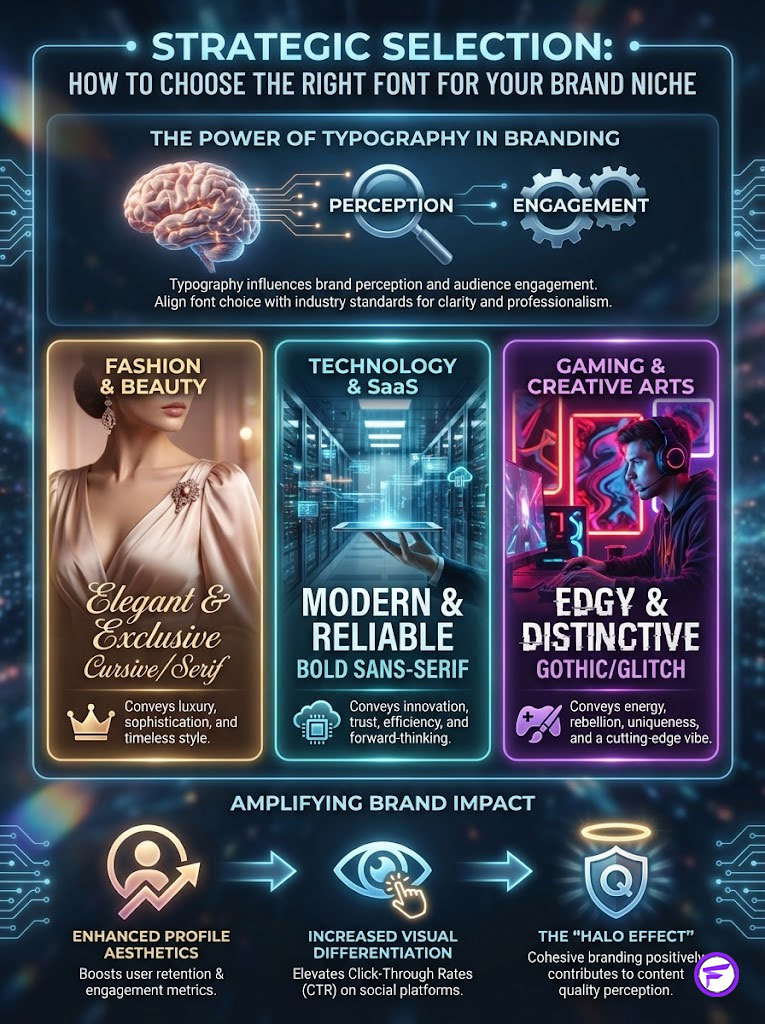
Matching Typography and Aesthetic Fonts for Instagram to Industry Standards
Different font styles evoke different psychological responses in the viewer. Understanding this semiotics is key to converting profile visits into follows.
Fashion, Beauty, and Luxury Markets:
These industries thrive on elegance, fluidity, and human connection. Cursive fonts or Serif styles (which have small decorative lines at the ends of strokes) work best here. They mimic the typography found in high-end editorial magazines like Vogue or Harper’s Bazaar. Using a script font implies a personal touch and exclusivity.
- Recommended Styles: Script, Serif, Cursive, Italics.
Technology, SaaS, and Startup Markets:
Clarity is king in the tech world. You want to convey modernity, efficiency, and reliability. A bold text Sans-Serif font is powerful here. It looks clean, authoritative, and mimics the coding environments or sleek interfaces of modern software. It tells the user you are direct and solution-oriented.
- Recommended Styles: Sans-Serif Bold, Monospace, Small Caps.
Gaming, Streetwear, and Creative Arts:
These audiences appreciate counter-culture aesthetics and distinctiveness. Old English or Gothic styles signal heritage, toughness, and underground credibility. Glitch text allows for a cyber-punk feel that resonates with Gen Z and digital artists.
- Recommended Styles: Fraktur, Gothic, Glitch, Bubbles.
Analyzing the Psychological Impact of Font Styles by Industry
Below is a detailed breakdown of how specific industries should leverage instagram profile customization through font choices to maximize audience resonance.
| Industry Niche | Recommended Font Style | Psychological Impact | Brand Example |
| Luxury / Beauty | 𝒞𝓊𝓇𝓈𝒾𝓋ℯ / 𝒮𝒸𝓇𝒾𝓅𝓉 | Elegance, Exclusivity, Human Touch | ℒ𝓊𝓍ℯ ℬℯ𝒶𝓊𝓉𝓎 |
| Business / SaaS | 𝗦𝗮𝗻𝘀 𝗕𝗼𝗹𝗱 | Authority, Trust, Modernity | 𝗧𝗲𝗰𝗵 𝗦𝗼𝗹𝘂𝘁𝗶𝗼𝗻𝘀 |
| Gaming / Creative | 𝔊𝔬𝔱𝔥𝔦𝔠 / 𝕿𝖊𝖝𝖙 | Edgy, Historic, Distinctive | 𝕯𝖆𝖗𝖐 𝕶𝖓𝖎𝖌𝖍𝖙 |
| Lifestyle / Blog | Ⓒⓘⓡⓒⓛⓔⓓ | Friendly, Playful, Approachable | Ⓢⓐⓡⓐⓗ Ⓛⓘⓕⓔ |
| Wellness / Yoga | Wide Text | Space, Breath, Calmness | Zen Mode |
| Minimalist | 𝚂𝚖𝚊𝚕𝚕 𝙲𝚊𝚙𝚜 | Clean, Understated, Organized | 𝙼𝙸𝙽𝙸𝙼𝙰𝙻 |
The “Curb Appeal” Effect and Engagement Metrics
Marketing data consistently suggests that visual differentiation leads to higher profile retention. When a user searches for a generic term like “Fitness Coach” in the Instagram Explore tab, the search results show a list of names. If ten profiles use standard text and one uses a clean bold text style, the eye is naturally drawn to the anomaly. This visual disruption creates a higher Click-Through Rate (CTR) from the search list to the profile view. Once on the profile, the cohesive aesthetic contributes to the “Halo Effect,” where the user assumes the content quality matches the high quality of the branding.
Technical Risks and Accessibility Issues with Fancy Text
While aesthetic fonts for instagram are visually pleasing and branding-friendly, they come with significant technical downsides. As a responsible content creator or social media manager, you must balance aesthetics with functionality and inclusivity.

The Accessibility Dilemma: Screen Reader Friendly Fonts
This is the most critical ethical and technical factor to consider. Millions of users navigate the internet using screen readers due to visual impairments. These accessibility tools read the code behind the text to describe what is on the screen.
Because you are using mathematical symbols and not real letters, a screen reader will not read the name “Sarah” written in script as the name “Sarah.” Instead, it might read the Unicode description of each character:
“Mathematical Script Capital S, Mathematical Script Small A, Mathematical Script Small R, Mathematical Script Small A, Mathematical Script Small H.”
This is a terrible user experience that renders your name unintelligible to blind or low-vision users. If you decide to change instagram name font to something highly decorative, you risk alienating this demographic entirely.
- Best Practice Strategy: If you use a fancy font in your Name field, ensure your Bio or your Handle contains your name in plain text so screen reader friendly fonts are available somewhere on your profile. This ensures inclusivity while maintaining your aesthetic.
Instagram SEO for Display Names and Search Indexing
Does instagram seo for display names suffer when you use fancy fonts? The short answer is yes. Instagram’s search algorithm indexes the text in your Display Name field to help people find you when they search for keywords.
If your name is written in unicode text converter symbols, the algorithm may not recognize the characters as letters. It sees them as symbols.
- Instance: If a user searches for “Photographer,” and your name is written as 𝔓𝔥𝔬𝔱𝔬𝔤𝔯𝔞𝔭𝔥𝔢𝔯, you might not appear in the search results because the search engine looks for the ASCII characters “P-h-o-t-o…” not the mathematical symbols.
- Optimization Strategy: Keep your primary keywords (e.g., “Photographer,” “Coach,” “Artist”) in standard text, but put your name in fancy text for instagram name. Alternatively, ensure the keyword is heavily present in your username handle and bio description.
Device Compatibility and the “Tofu” Box Issue
Have you ever seen a profile name that looks like a row of empty rectangles (▯▯▯)? In the tech world, this is known as the “tofu” effect.
It happens when the viewer’s device is running an older operating system or lacks the specific font file required to render the Unicode version you chose. While iOS and Android are getting better at supporting aesthetic fonts for instagram, older budget phones and some desktop browsers may still struggle.
- Risk: If your name appears as boxes, you lose all brand identity and look unprofessional.
- Solution: Stick to widely supported styles like Bold or Italic and avoid the overly complex or obscure symbol sets if you want maximum global compatibility.
Detailed Comparison: Standard Text vs. Unicode Limitations
The following table outlines the technical trade-offs you make when switching from standard system text to unicode text converter characters.
| Feature | Standard Text | Unicode/Fancy Text |
| Searchability | High (Fully Indexed) | Low (Often Skipped by Algorithm) |
| Accessibility | Native Screen Reader Support | Poor / Read as Mathematical Symbols |
| Cross-Platform View | 100% Consistent | May vary (Boxes on old devices) |
| Character Count Cost | 1 Byte per character | 1-4 Bytes per character |
| Visual Impact | Neutral / Blends In | High / Attention-Grabbing |
| Policy Risk | Zero Risk | Low Risk (Some symbols flagged) |
Troubleshooting Common Errors and Navigating Platform Rules
Before you commit to a change instagram name font, you must be aware of the platform’s rigid rules. Instagram has automated systems in place to prevent spam, and fancy text can sometimes trigger these filters if not used correctly.
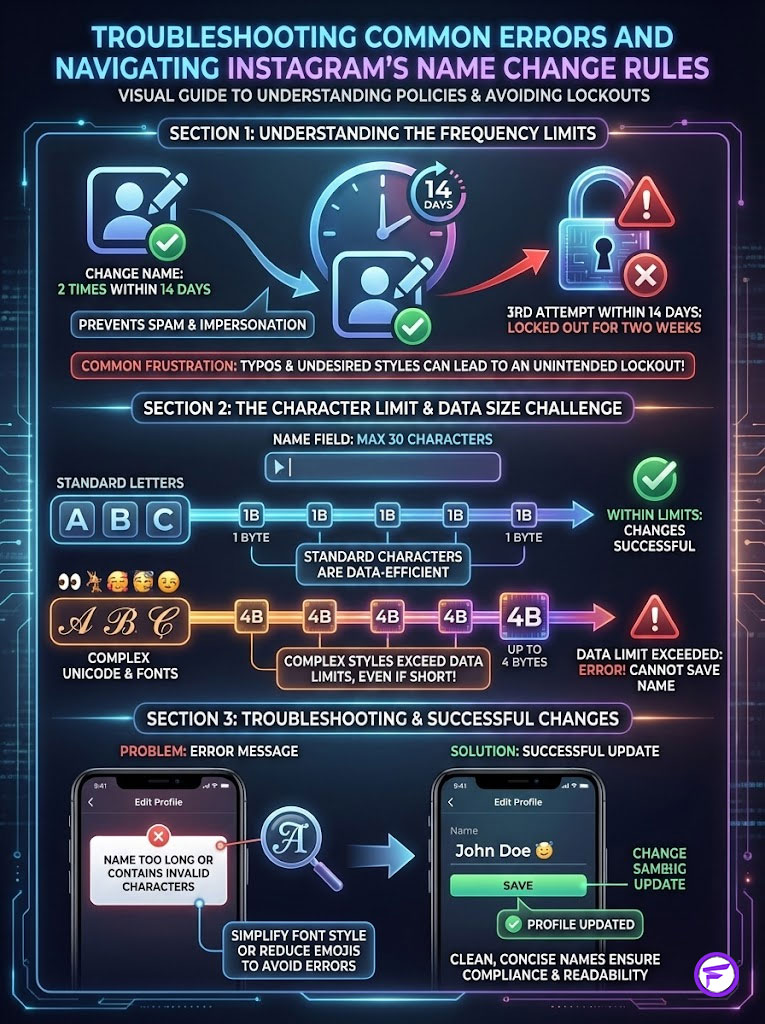
Navigating the 14-Day Name Change Limit
Instagram has a strict security policy that prevents users from changing their Name field more than twice within a 14-day period. This is designed to prevent spam, impersonation, and confusion among followers.
This rule is the number one source of frustration for users experimenting with cool fonts for instagram name. If you generate a font, paste it, save it, and then realize there is a typo or you dislike the style, you can fix it once. However, if you try to change it a third time, you will be locked out of that field for two weeks. You will be stuck with the error or the font you dislike.
- Pro Tip: Always test your copy and paste fonts in the “Bio” section first. The Bio field does not have the strict 14-day lock. Once you are happy with how it looks in the Bio, copy it and move it to the Name field.
Understanding Character Limits and Byte Size
The Name field on Instagram allows for 30 characters. However, this is not as straightforward as it seems when using unicode text converter characters. Standard letters take up 1 byte of data. Complex Unicode symbols can take up to 4 bytes of data.
Occasionally, a short name in a very complex fancy style might be rejected by Instagram because the code behind it exceeds the data limit, even if it looks short visually. If you receive an error message saying your name is too long, try a simpler font style or reduce the number of emojis used alongside the text.
Advanced Customization: Extending Aesthetic Fonts to Bio and Highlights
Once you have mastered the display name, you can extend your instagram profile customization to other areas of your account for a cohesive brand look.
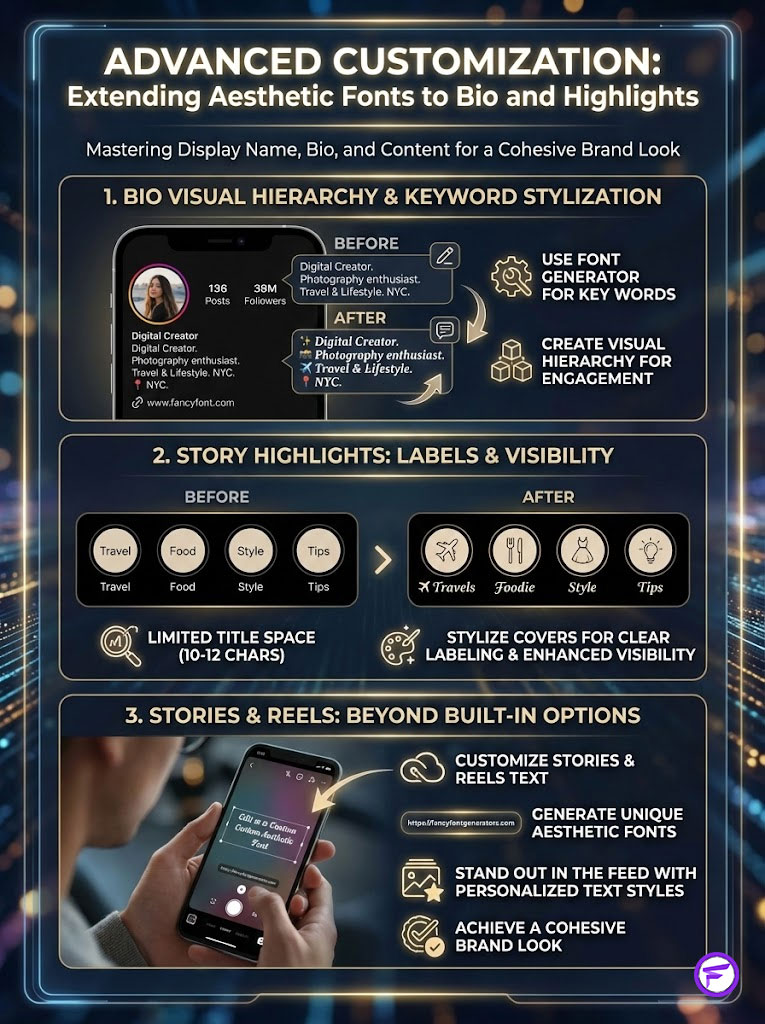
Extending the Aesthetic Beyond the Name to the Bio
You can use the same instagram name font generator to stylize key words in your bio. This is an excellent way to create a visual hierarchy.
- Example: Instead of writing “NYC Based,” you could use 📍 𝐍𝐘𝐂 𝐁𝐚𝐬𝐞𝐝.
This draws the eye to specific information like location, occupation, or your call to action (CTA). However, do not write your entire bio in fancy text, as it becomes difficult to read and may flag spam filters.
Stylizing Story Highlights Covers
Your Story Highlights appear as circles below your bio. You can use fancy text for instagram name to label these highlights. Because the space for highlight titles is very small (about 10-12 characters before truncation), using a distinct font can make short titles pop.
- Strategy: Use a single, large bold text letter or an emoji as the title for a minimalist look, or use a spaced-out font like L I F E to make the text wider and easier to tap.
Customizing Instagram Stories and Reels Text
While Instagram Stories has built-in fonts, they are limited to about 5-9 styles depending on your region. You can bypass this limitation by generating text at https://fancyfontgenerators.com, copying it, and pasting it directly into the text tool in your Story editor. This allows you to use aesthetic fonts for instagram that no one else has access to via the standard menu, giving your content a unique visual signature that stands out in the feed.
Summary and Key Takeaways
Your Instagram name is more than just a label. It is a branding asset that sits at the top of your digital portfolio. By deciding to change instagram name font, you are taking control of your visual narrative and differentiating yourself from the masses. However, this power comes with responsibility towards accessibility, searchability, and user experience.
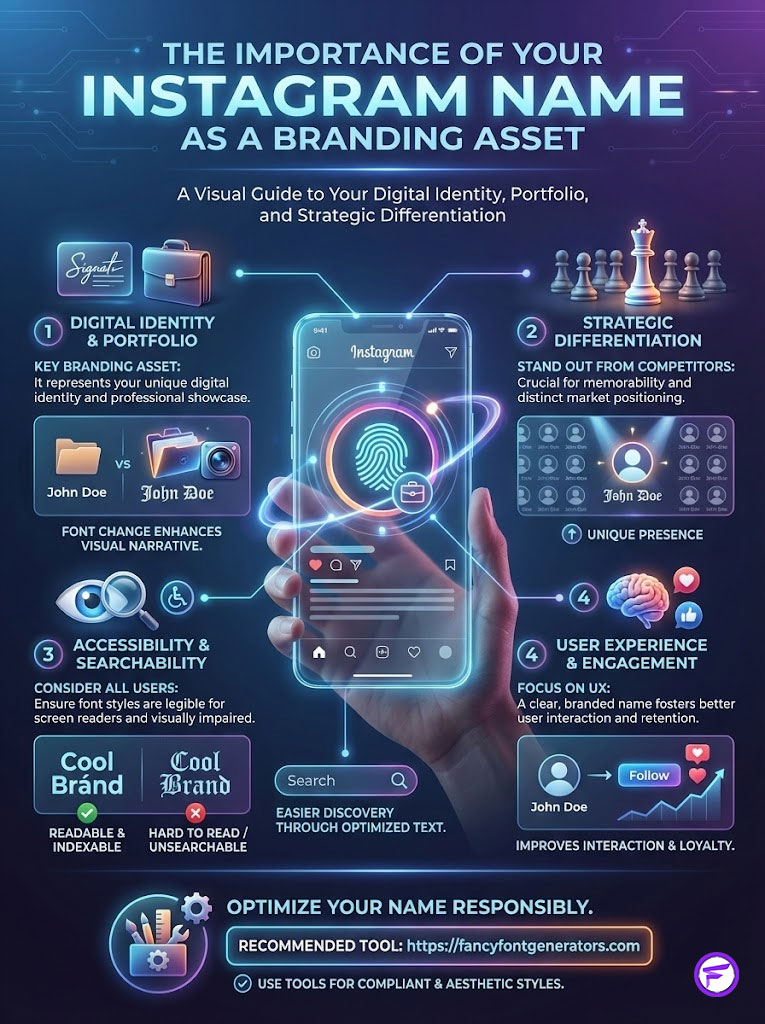
Your Action Checklist:
- Check Your Status: Ensure you haven’t changed your name twice in the last 14 days to avoid being locked out.
- Select Wisely: Choose a font that aligns with your industry psychology (e.g., Serif for beauty, Bold for tech).
- Test for Accessibility: Keep vital keywords in standard text for SEO purposes and consider screen reader users.
- Verify: Check your new name on a friend’s phone or a different device to ensure it doesn’t appear as empty boxes.
Ready to transform your profile? Generate compliant, aesthetic, and compatible styles immediately at https://fancyfontgenerators.com and give your Instagram identity the upgrade it deserves.
Frequently Asked Questions (FAQ)
Why can’t I change my Instagram name font in the app settings?
Instagram prioritizes a uniform user interface to keep the app looking clean and consistent. They do not offer built-in font customization to prevent the platform from looking cluttered. You must use an external unicode text converter to generate symbols that look like fonts, which the app then accepts as text.
Will using fancy text lower my follower engagement?
It typically increases visual engagement because your profile stands out in search results and comments. However, if the font is unreadable or appears as boxes on some devices, it can hurt trust and lower engagement. Legibility is key to maintaining a connection with your audience.
Is it safe to use third-party font generators?
Yes, it is safe as long as the tool is web-based and does not ask for your Instagram login credentials. Tools like the one recommended in this guide simply convert text and do not access your account data or permissions.
Can I use these fonts in Instagram captions?
Yes, copy and paste fonts work perfectly in captions, comments, and even Direct Messages. It is a great way to emphasize specific words in a long post or to create “headings” within your caption text.
What happens if I regret my font change immediately?
If you have not used your two permitted name changes within the 14-day window, you can revert it immediately to your old name. If you have already changed it twice, you must wait for the 14-day “cooling-off” period to expire before you can edit it again.
Do these fonts work on TikTok and Twitter (X)?
Yes, most social platforms support Unicode standards. You can use the same instagram name font generator to customize your Twitter name, TikTok bio, Facebook posts, or even your YouTube channel name.
Why does Instagram say my name contains invalid characters?
Instagram blocks certain specific Unicode symbols that are often used by spammers or that mimic “Official” verification badges (like checked circles). If you get this error, try a simpler font style from the generator and avoid excessive symbols.
How do I make my name invisible on Instagram?
This requires a specific “Hangul Filler” or invisible Unicode character. However, Instagram frequently patches these characters to prevent anonymity, so this method is unreliable and not recommended for serious brands or influencers.
Does the font style depend on my phone model?
The generation of the font does not depend on your phone, but the viewing does. Newer iPhones and Androids support more Unicode characters than older models. Always stick to standard fancy styles to ensure your audience can see them regardless of their device age.
Can I mix different font styles in one name?
Yes. You can generate one word in bold text, copy it, then generate another word in cursive, and paste them both into the Instagram name field to create a mixed-media look. This is a popular strategy for separating a name from a job title.
Do fancy fonts affect Instagram SEO?
Yes. Heavily stylized fonts are difficult for Instagram’s search algorithm to read. If you want to rank for a keyword like “Trainer,” keep that word in standard text or in your username handle to ensure you appear in search results.
How do I get a bold font on Instagram without an app?
Simply visit a web-based generator like the one linked in this guide, type your text, select the bold option, and paste it. You do not need to install any keyboard applications or software to achieve this effect.
Disclaimer: This article is for educational and informational purposes only. While using Unicode fonts is generally accepted, Instagram’s policies on third-party characters can change. Always prioritize the security and accessibility of your account.
References:
- Unicode Consortium Standards (unicode.org)
- Instagram Help Center: Managing Your Profile
- W3C Web Accessibility Initiative (WAI) – Text Alternatives